The LP pipeline
for managers raising a fund.
Type what happened in plain words and it files the record.Keep a next step and a drafted message on every investor.Let your agent log investor replies. You send every message.
GPAgent never contacts your investors. The one exception is the portal invitation, and only when you click Give access.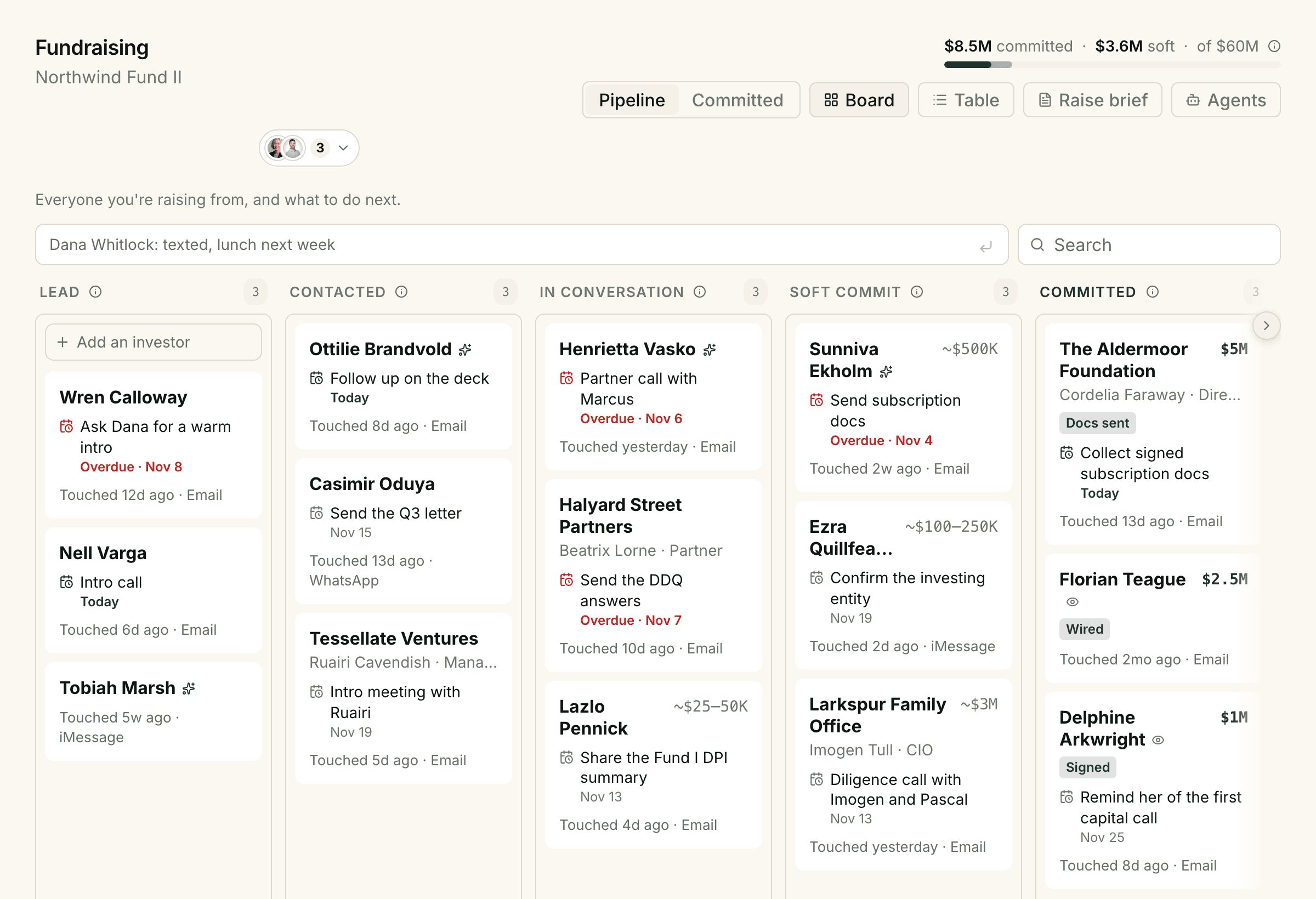
What it is
Fundraising in GPAgent is one list of everyone you are raising from, per fund, with a next step on every name. You type what happened the way you would text it to yourself, and it files the record. Your Relationship Manager agent drafts the follow-up in your voice and logs investor replies from your inbox. It never sends anything: you copy the draft into whatever app the conversation lives in.
The raise lives
in a notes app.
A first raise rarely lives in a CRM. It lives in a notes app: forty names, a few with amounts, most with a line like “said maybe after Q1.” The conversations are spread across text, WhatsApp, email and LinkedIn, so the notes app is the only place they meet, and it is always a few days behind.
The hardest names on it are the soft commits. You know you should follow up. You also know that chasing too hard can cost you the check.
Fundraising replaces the list, not the conversations. You keep talking to investors wherever you already do.
Type it the way you’d text it.
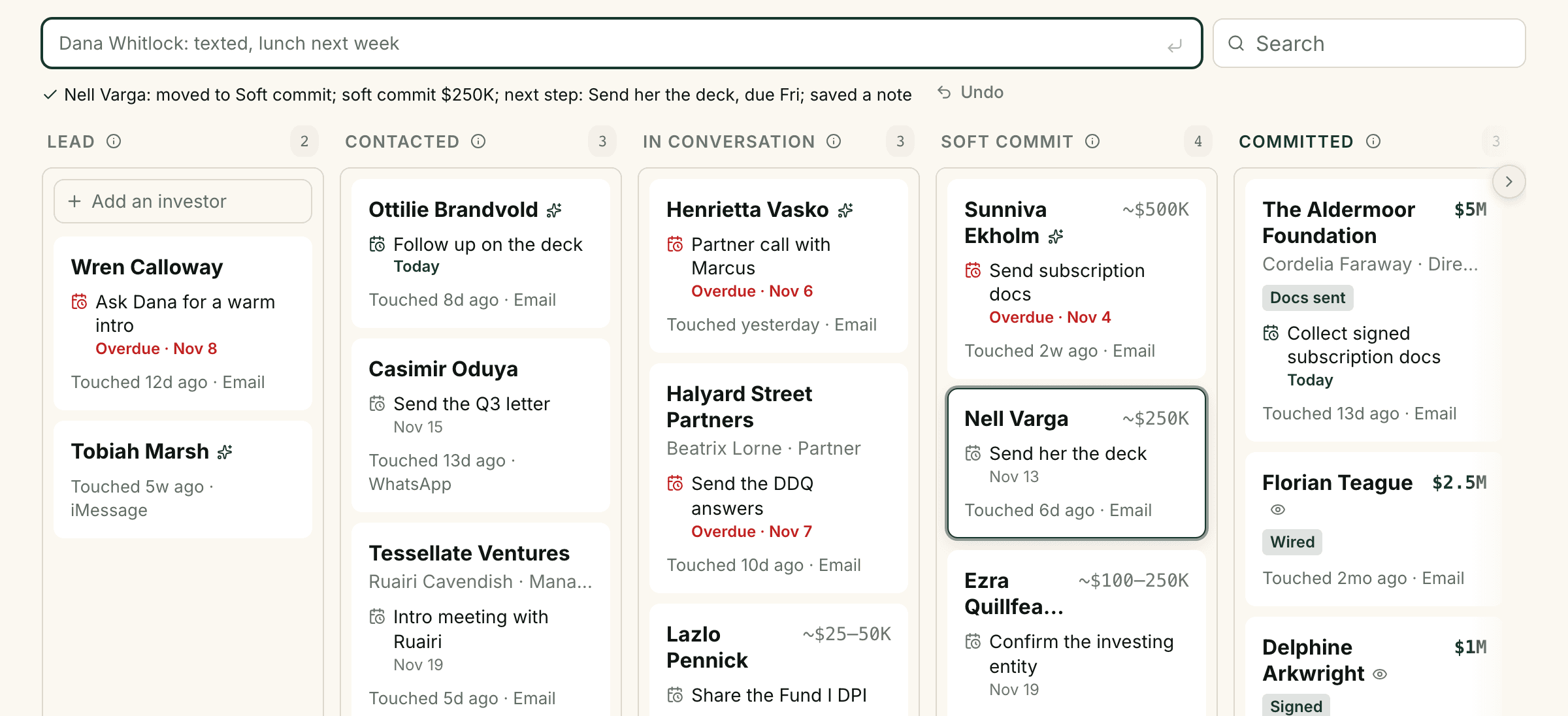
One bar sits at the top of the page. Type “Nell Varga: great intro call, she is in for 250k, send her the deck Friday” and press Enter. Nell moves to Soft commit with $250K indicated, her next step is set for Friday, and the line is kept as a note. One line under the bar says what was written, with Undo beside it.
- Paste the whole list from your notes app. You see what will be created before anything is.
- It doesn’t guess. A number with no unit is left unset, and a line about “a guy from the conference” asks for a name.
- If the model is slow or down, your line is saved as a note. Nothing you type is lost.
A next step on every name, and the message to send.
Every investor carries a next step and a date. The date comes from a rule, not a mood: reply the same day when they wrote last, follow up the next working day after a meeting, and wait four working days after a message that got no answer. Each unanswered message doubles the wait, up to twenty working days, so a quiet investor hears from you less, not more.
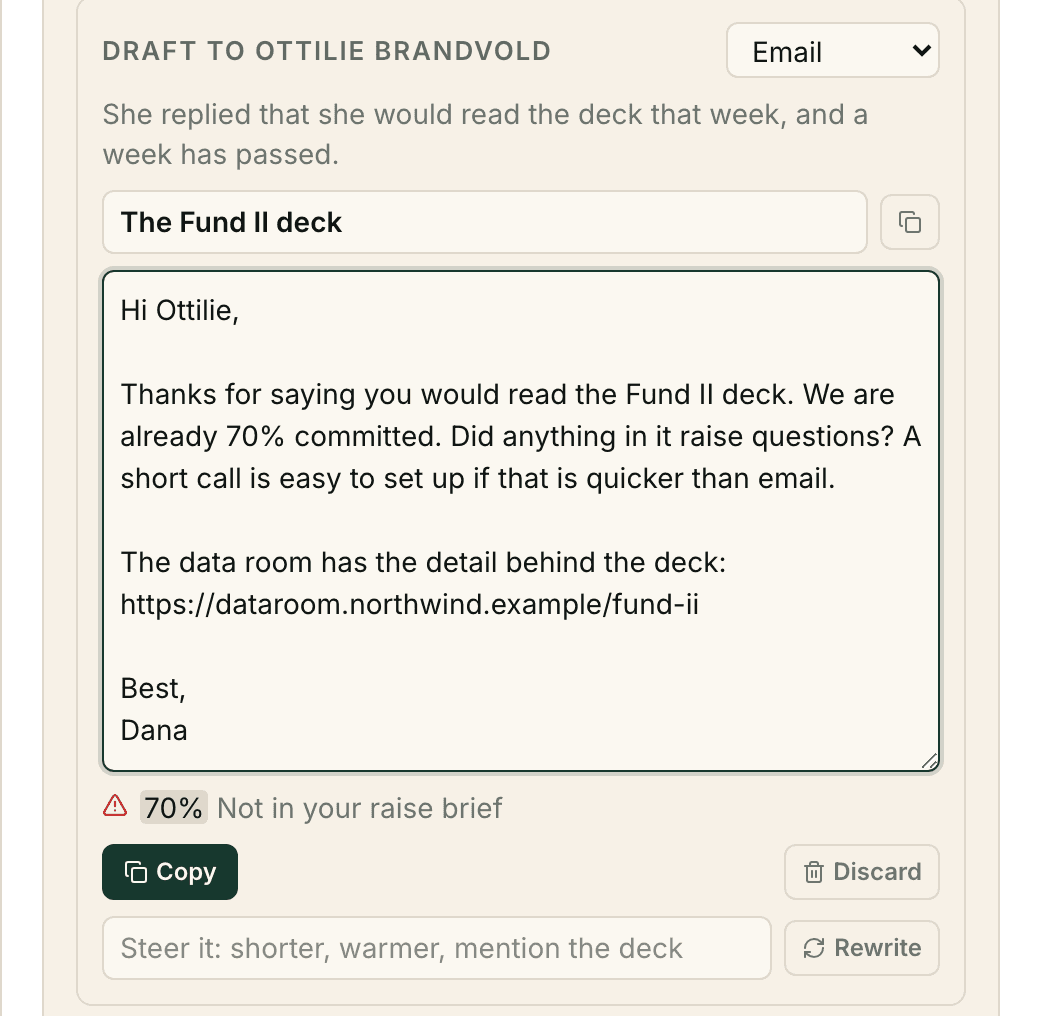
Press D and the Relationship Manager drafts the message on that investor’s channel: two lines for a text, a short email for email. It writes from your raise brief, the one page of terms, links and talking points you keep for each fund, and from what happened on the timeline. Any number, date or link that the brief and the record don’t support is flagged before you copy it.
- Copy it, send it from your own app, then press Log as sent.
- A phrase on your never-say list blocks Copy until it’s gone.
The agent works your inbox and shows its evidence.
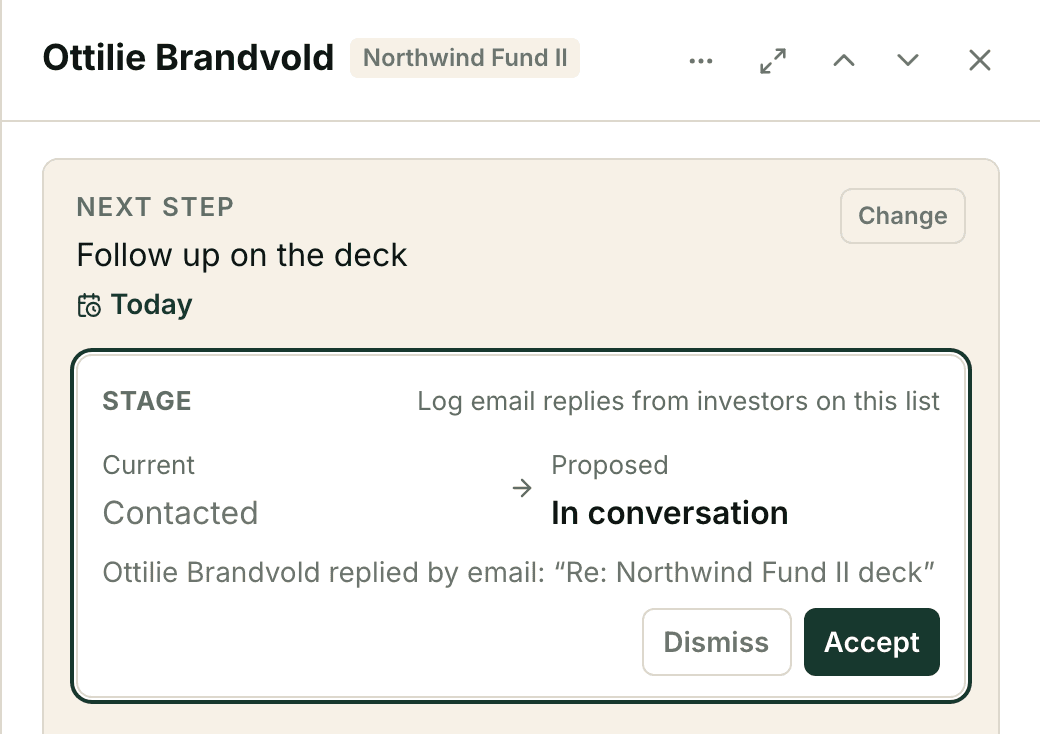
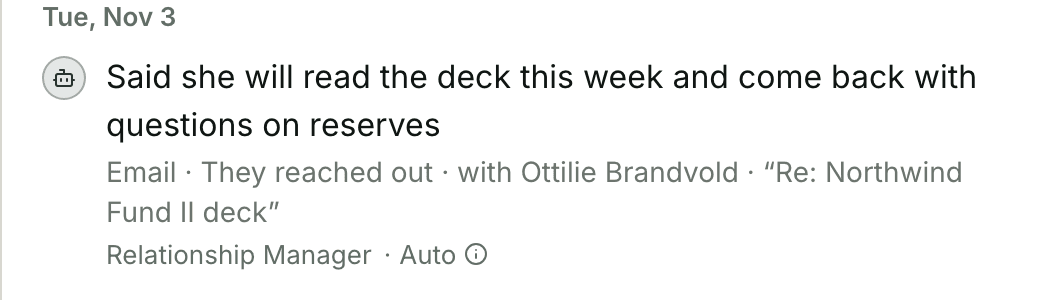
Connect Gmail and the Relationship Manager reads mail between your firm and the people on your list, matched by exact email address. A reply lands on the investor’s timeline with its subject line, labelled with the agent that logged it. A yes, an amount or a no in an email becomes a suggestion beside the current value, with Accept and Dismiss. Nothing else in the mailbox is opened, and message bodies are not stored.
A fund administrator’s confirmation in your inbox, usually one an LP forwarded you, becomes a one-click suggestion with the email as evidence: Committed, Wired and the amount, accepted together. A forward is never applied on its own, because anyone can type a forward. AngelList’s “Investment Complete” email is the first one it reads.
- Already logged that email by hand? It attaches the email to your entry instead of logging it twice.
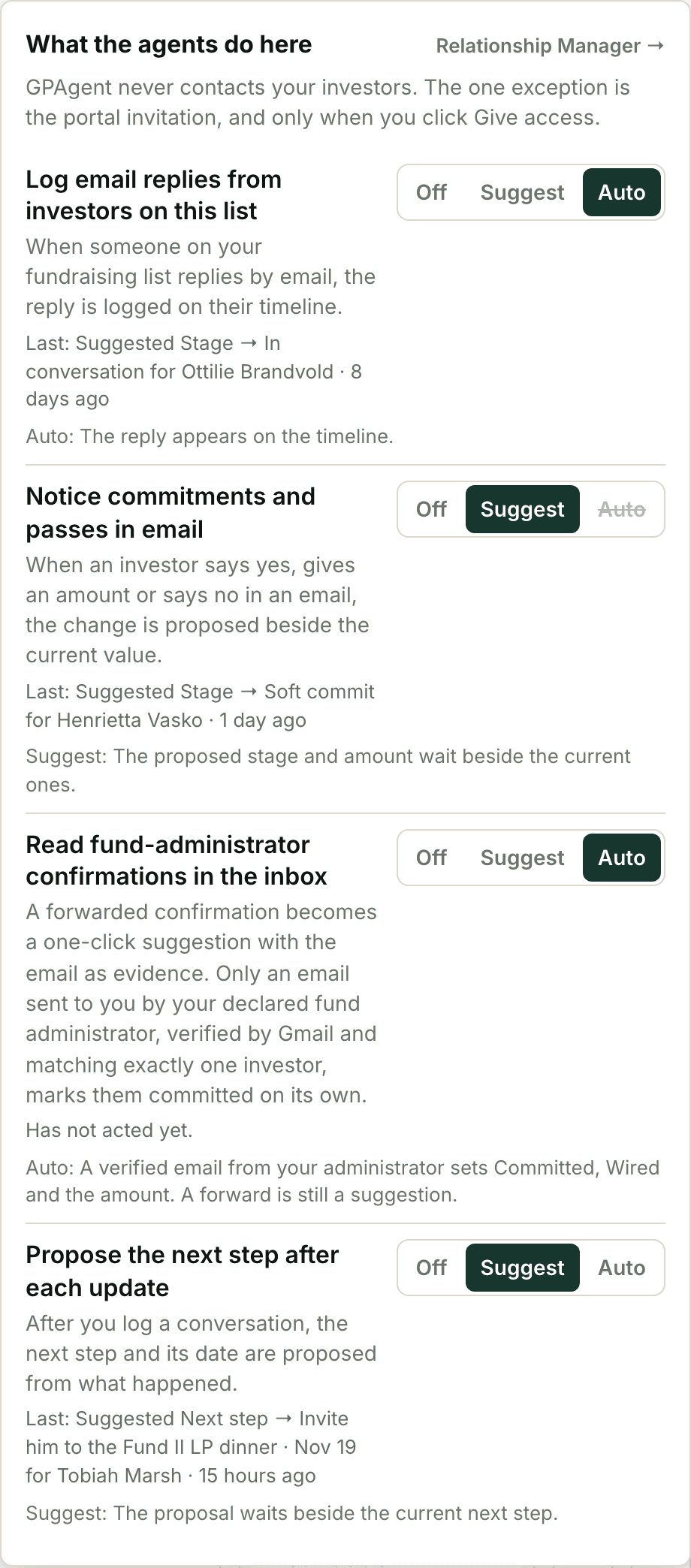
Off, Suggest or Auto, set per job.
Each thing the agent does on its own is a row you can switch: logging replies, noticing commitments and passes, reading administrator confirmations, proposing next steps. Each row says what the agent did last.
A commitment or a pass in an email has no Auto: it always waits for you. Drafting is not a row, because a draft is only written when you ask for one, and you copy it yourself.
When they commit, the record keeps going.
Committed investors stay on the list, in a Committed view showing what each one put in and where closing stands: docs sent, signed, wired. Stage and closing status are separate fields, so “committed, docs not back yet” is something the page can say.
Give portal access from the record and the same person becomes an LP in your investor portal, on the fund they committed to. A prospect you have given Community access shows a mark on their card when they open the portal.
Explore the LP PortalEvery action has a key.
- A
- Type a line into the capture bar
- T
- Move to the next stage
- P
- Mark as passed
- S
- Set the next step
- D
- Draft the message
- C
- Copy the draft
- Y / X
- Accept or dismiss a suggestion
- ⌘ Z
- Undo the last change
- ?
- Every key on the page
What it won’t do.
It never sends.
No send button, no sequences, no reminders. The one email in this product is the portal invitation, and only when you click Give portal access.
It doesn’t read your texts.
Texts, WhatsApp and LinkedIn messages reach the record when you type or paste them. Email is the only channel it reads, and only for people on your list.
It isn’t your fund administrator.
Subscription documents, capital accounts and wires stay with your administrator. Fundraising records that a commitment happened. It reads the administrator’s confirmation email, not its system.
It’s for the managers today.
Everyone with manager access to the firm sees the pipeline. Sharing it with a collaborator or an outside IR hire is not available yet.
What fund managers ask first.
Does it email my LPs or prospects?
No. GPAgent drafts; you copy the message and send it from your own email, phone or LinkedIn. The only email this product sends is the standard portal invitation, when you click Give portal access on a record.
What does it read in my inbox?
Only mail between your firm and the email addresses on your fundraising list, plus confirmation emails from fund administrators. It keeps the subject line and a link back to the message, not the body. Without a connected Gmail inbox nothing is read, and you log touches by typing them.
Can the agent mark an investor as committed?
A forwarded fund-administrator confirmation becomes a one-click suggestion with the email as evidence. Only an email your declared administrator sent you directly, verified by Gmail and matching exactly one investor, marks them committed on its own, and only while that job is set to Auto. An investor writing “I’m in” becomes a suggestion you accept or dismiss.
How do I move my list over from a notes app or a spreadsheet?
Paste it into the capture bar, or drop in a CSV file. From a notes app, each line becomes an investor with whatever stage, amount and next step it states. From a spreadsheet, columns are matched by their headers, Status and Amount are taken exactly as written, and the preview shows which column means what so you can change it. You confirm the whole list once before anything is created.
Can I record a soft commit as a range?
Yes. Type “25-50k” and the card shows the range. Raise totals count the low end, so the progress bar never runs ahead of you.
We are raising two funds at once. Does that work?
Yes. Each fund has its own list. The same investor can sit on both at different stages, and their record shows where they stand in the other fund.
Do I need the rest of GPAgent to use it?
No. Fundraising works on its own. It gets more useful beside the LP Portal, because a prospect becomes an LP on the same record and their portal visits show on their card.
Run the raise
from one list.
Fundraising is run by the Relationship Manager, one of the specialists on your team. We onboard a few funds at a time, by hand.
Book a demo